This is an old revision of the document!

VM Reactor
Virtual machines, containers and applications – one web interface for your Debian host.
KVM virtual machines, LXC system containers and Docker applications side by side: one list, one number for every guest, one place to start, watch, back up and protect them. Part of the Stratum project – your host remains Debian.
VM Reactor 0.16 – Technical Preview · Debian 13 (trixie) and Debian 14 (forky) · amd64 and arm64 · free software (GPL-3+) · package vm-reactor in the Stratum repository (component contrib)
Technical preview. VM Reactor is new and still changing: features, settings and the web interface may change from one version to the next. Try it, test it and tell us what you think – but keep backups of your guests and do not rely on it alone for production systems yet.
A contrib package of the Stratum repository. VM Reactor is published in the component contrib of the Stratum repository, next to the Stratum modules in main. It builds on Stratum – it needs stratum-init and works together with the Stratum modules – but it enjoys a certain independence from them: its own versions and release cycle, its own web interface, its own handbook and this page of its own.
Overview
VM Reactor turns a Debian computer into a host for guests. It manages virtual machines (KVM with libvirt), system containers (LXC) and applications (Docker compose projects) in one web interface with its own port – HTTPS, 8443 by default. Every guest has a number: the host is ID 0, the guests are 1, 2, 3 …, whatever their type. Each guest has exactly one configuration file (/etc/vm-reactor/guests/<id>.conf) and one directory in a storage – nothing is hidden in a database, and everything the web interface does can also be done on the command line with vm-reactor.
VM Reactor uses the tools Debian already has: libvirt and QEMU, LXC, Docker from Docker's own repository (installed together with VM Reactor and managed by it), nftables and dnsmasq. It works together with the Stratum modules – firewall, sign-in protection, WireGuard mesh, support – when they are installed.
docker run command, an image wizard or a template (nginx, Nginx Proxy Manager, Uptime Kuma, Vaultwarden, Portainer, MariaDB, Nextcloud …). Automatic updates with rollback, CPU and memory limits, registries, images, volumes, networks and events in one place.
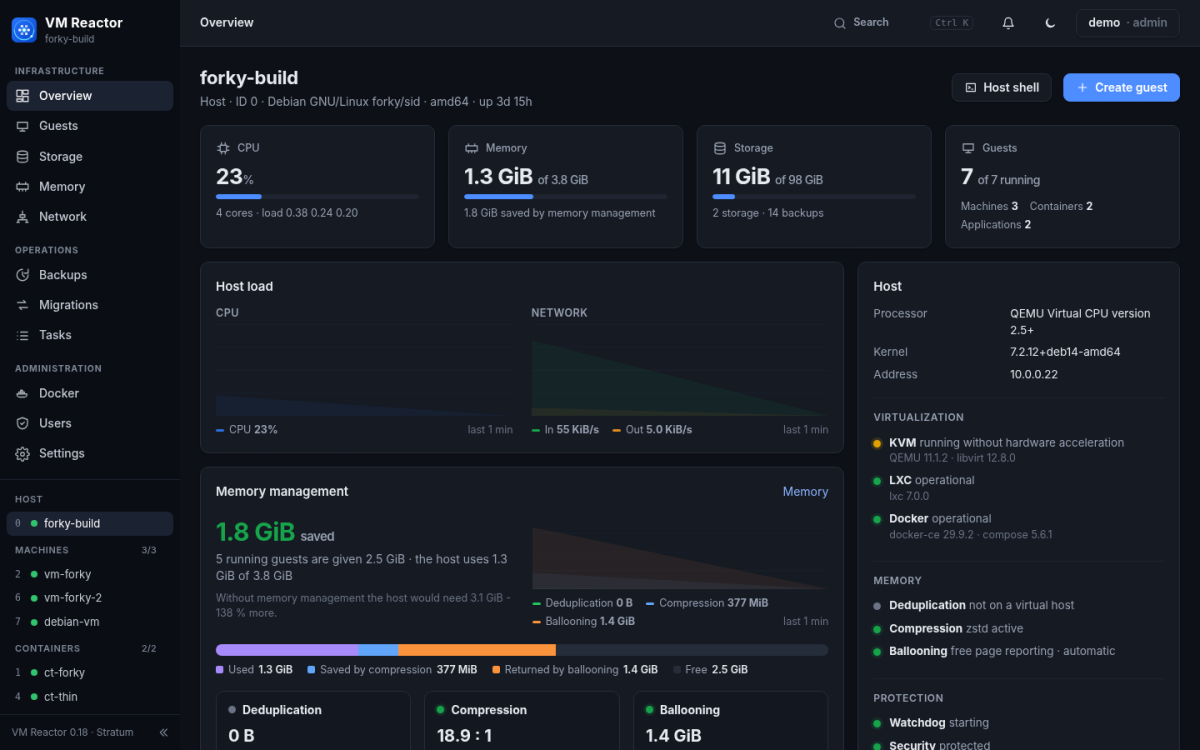
stratum-memory. The Overview shows in real time how much RAM each of them saves.
A look inside
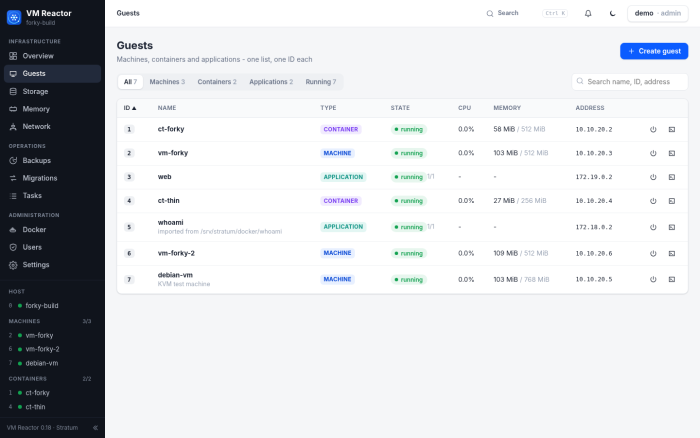
Guests – machines, containers and applications in one list, one ID each.
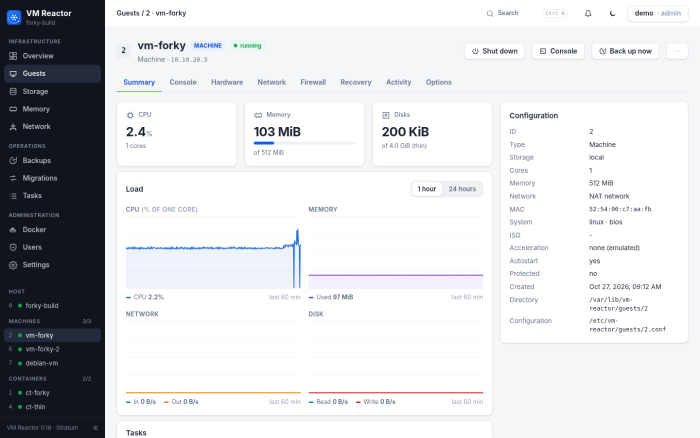
A virtual machine – state, configuration and load charts.
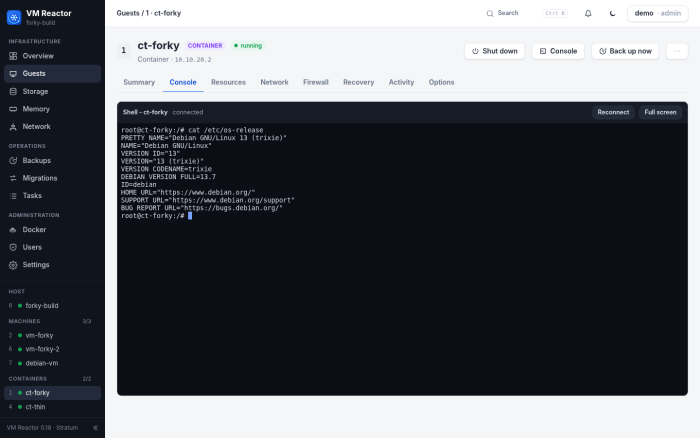
The console in the browser – the shell of a container.
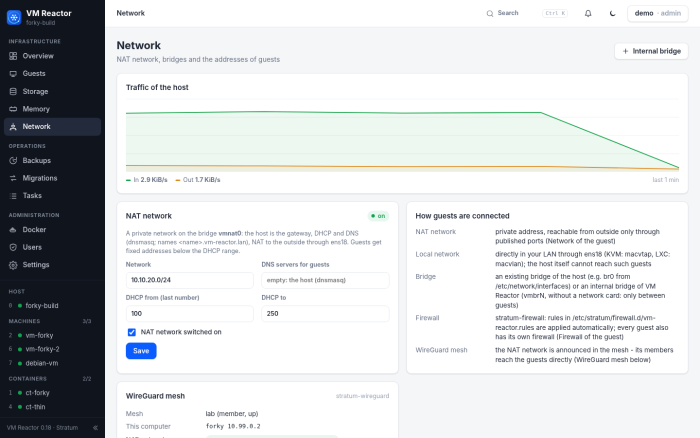
Network – traffic of the host, the NAT network, the WireGuard mesh and the bridges.
More guests in the same memory – an advanced feature of VM Reactor. Memory – a page of the main menu – brings three techniques together, always in this order: deduplication keeps identical memory pages of the virtual machines only once (ksm), compression keeps idle guest memory compressed in RAM (zram, typically 3:1 and more), and ballooning returns memory the machines do not use to the host (virtio-balloon). VM Reactor switches them on at the installation with values recommended for a virtualization host (stratum-memory, type VM Reactor host), and the panel Memory management on the Overview shows in real time – one curve each – how much RAM they save.
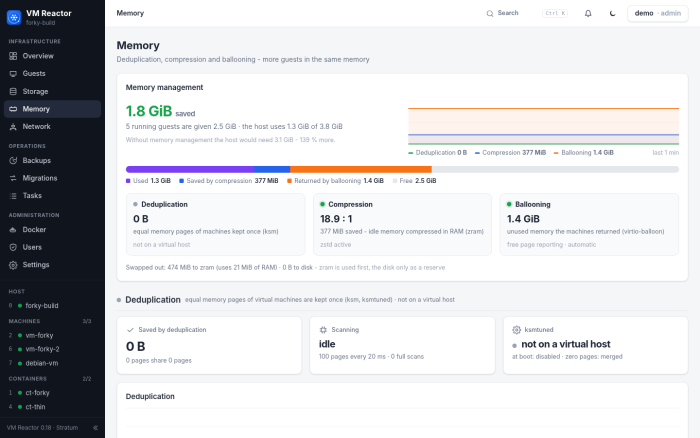
Memory – memory management at the top, then deduplication (ksm) and compression (zram with zstd or lz4), each with its light, its numbers and its chart.
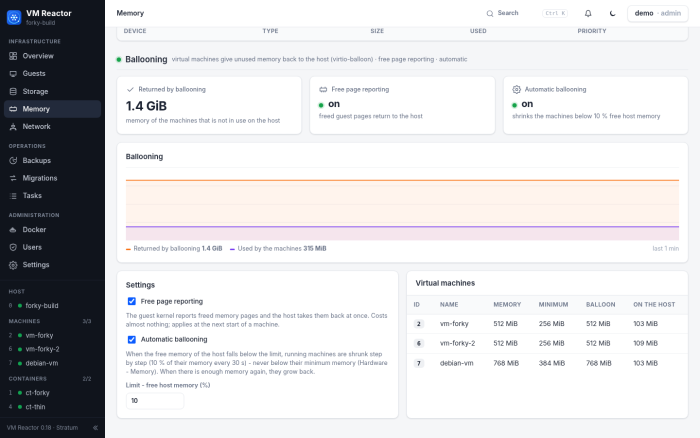
Ballooning – free page reporting and an automatic balloon that never shrinks a machine below its minimum memory.
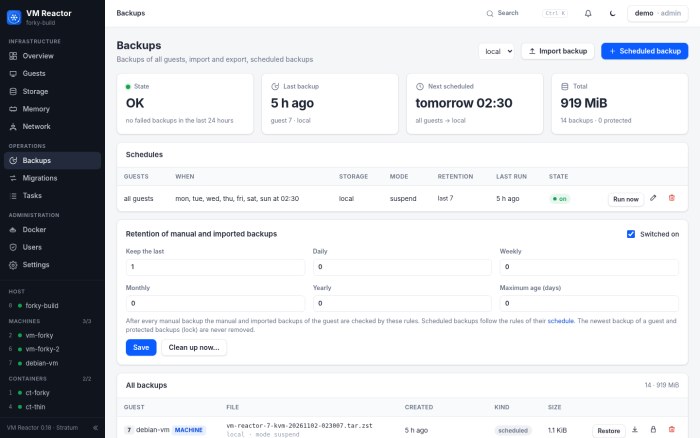
Backups – the state at a glance, schedules with retention rules, protected backups.
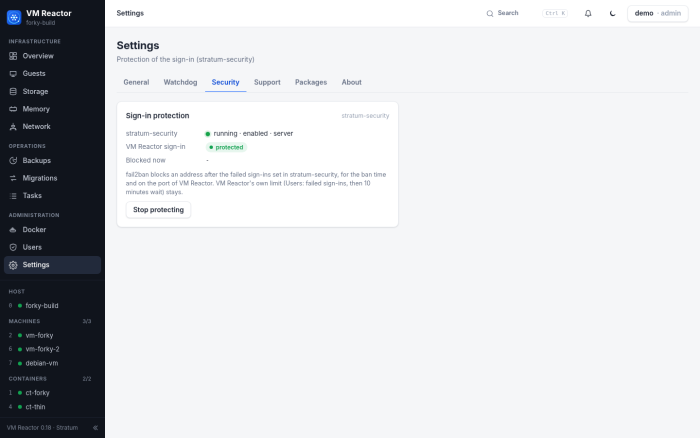
Settings – Security: the sign-in protected by stratum-security.
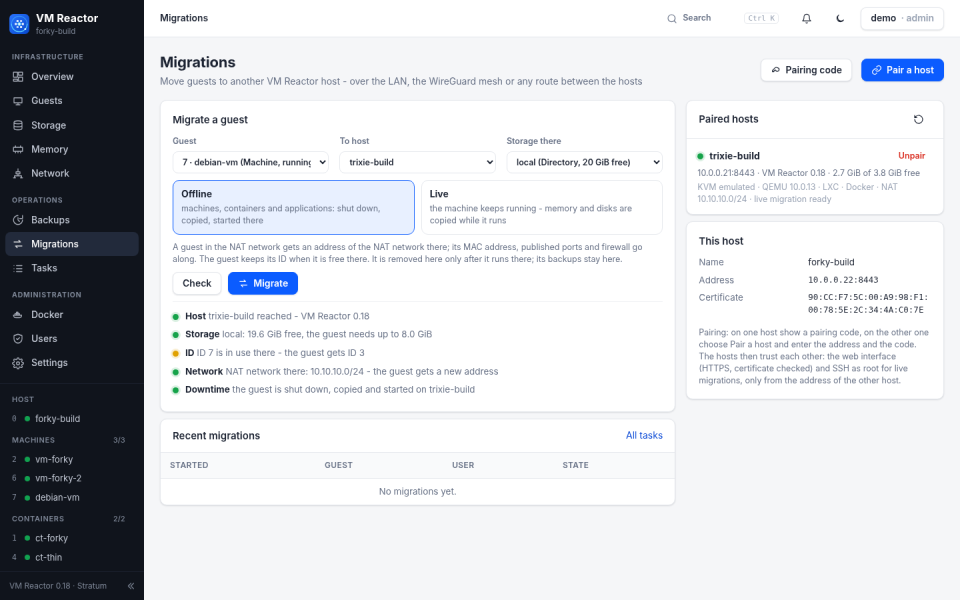
Migrations – paired hosts, the checks before a migration, offline or live.
Installation
What you need
| Item | Requirement |
|---|---|
| System | Debian 13 (trixie) or Debian 14 (forky), amd64 or arm64 – a physical computer or a virtual machine with nested virtualization |
| Virtualization | VT-x / AMD-V switched on in the firmware for KVM machines; without it, machines run emulated and slowly (containers and applications do not need it) |
| Stratum | stratum-init 0.40 or newer and the Stratum repository with the components main and contrib – see Stratum – quick setup |
| Memory and disk | Enough for the host and all guests; memory compression, deduplication and the balloon help when it gets tight |
| Browser | Any current browser; the web interface uses HTTPS on port 8443 |
1. The Stratum repository
If Stratum is not installed yet, follow the quick setup first. VM Reactor is in the component contrib – check that the APT source has it:
grep Components /etc/apt/sources.list.d/stratum.sources
# Components: main contrib non-free
Sources written by older versions of stratum-archive-keyring have only main; installing the current stratum-archive-keyring (or stratum-init) adds contrib and non-free by itself.
2. Install the package
apt-get update
apt-get install vm-reactor
APT brings everything VM Reactor needs from Debian – libvirt and QEMU, LXC, nftables, dnsmasq, noVNC – together with the Stratum modules it works with: stratum-memory for the memory setup, stratum-firewall, stratum-security, stratum-watchdog, stratum-software, stratum-support and stratum-wireguard. The installation asks one question – Install Docker from Docker's repository? (yes by default): VM Reactor then sets up Docker's key and repository and installs Docker as soon as APT has finished, as a task you can follow under Tasks. At the end, the installation prints the address of the web interface and where the first password is:
vm-reactor: first sign-in as user admin, password in /etc/vm-reactor/initial-admin-password
         (change it in the web interface: Security - My account; then delete the file)
vm-reactor: web interface https://10.0.0.22:8443/
3. First sign-in
- Open the address in the browser (
vm-reactor urlprints it again). The certificate is created on the host and is not signed by an authority – the browser asks once whether to trust it. - Sign in as admin with the password from
/etc/vm-reactor/initial-admin-password. - In Users → My account set your own password and switch on two-factor sign-in (an authenticator app); then delete the file:
rm /etc/vm-reactor/initial-admin-password. - Look at the Overview: the warnings at the top tell you what is still missing (for example hardware virtualization or noVNC), the status lights of the Host card show the state of KVM, LXC and Docker, of the memory techniques and of the protection, and the bell in the top bar lists what needs attention.
Docker is installed together with VM Reactor. If you answered no, or the setup stopped – for example because Debian's docker.io is installed, which VM Reactor never removes by itself; the bell says why – open Docker in the web interface and choose Install Docker, or run vm-reactor docker setup. Compose projects that already run on the host become applications with Docker → Import a compose project (vm-reactor docker import <folder>).
4. Your first guests
Create guest opens a wizard: choose the type, the name and the storage; a machine gets an ISO image, cores, memory and a disk, a container a system image, an application a compose file or a template. The guest appears in the list with the next free ID. By default it is in the NAT network and gets an address from the host's DHCP; publish ports to reach it from outside, or put it directly into your LAN.
Administration
Users and roles
Every role includes the rights of the ones before it. Users other than admins see only the guests in their scope (all, or a list of IDs).
| Role | May |
|---|---|
| viewer | see the guests of the scope: state, configuration, tasks |
| user | + start, shut down, stop, reboot and use the console |
| operator | + snapshots, backups and logs |
| manager | + create, change, clone and delete guests, Docker compose, disks, ISO images; restore and delete backups; schedules |
| admin | + the host: shell, storage, network, users, security, settings (always all guests) |
vm-reactor user add anna operator 3,4,7     # asks for the password
vm-reactor user list
vm-reactor user guests anna all
vm-reactor user 2fa-off anna                 # lost phone: switch two-factor sign-in off
vm-reactor user disable anna                 # sessions end at once
Securing the web interface
- Allowed networks (Users,
ALLOW_FROM): only these networks reach the web interface; VM Reactor refuses a change that would lock you out. - Sign-in limits: after
LOGIN_ATTEMPTSfailed sign-ins an address is blocked for 10 minutes; session timeout in minutes (SESSION_TIMEOUT). - stratum-security (Settings → Security): the protected service
vm-reactor– fail2ban bans addresses with too many failed sign-ins. - stratum-firewall: VM Reactor writes its own rules (port
8443, DHCP and DNS of the NAT network, forwarding of the guests) to/etc/stratum/firewall.d/vm-reactor.rules. - Own certificate: replace
/etc/vm-reactor/tls/vm-reactor.crtandvm-reactor.keyand runsystemctl restart vm-reactor. Behind a reverse proxy on the same host,LOCAL_HTTP_PORToffers plain HTTP on127.0.0.1only. - Audit log: every sign-in and change is in
/var/log/vm-reactor/audit.log.
Network
| Network | What the guest gets |
|---|---|
NAT (bridge vmnat0, 10.10.10.0/24 by default) | a private address from the host's DHCP, names <name>.vm-reactor.lan; reachable from outside through published ports. Fixed addresses below the DHCP range. |
| Local network | its own address in your LAN (machines: macvtap, containers: macvlan) – the host itself cannot reach these guests |
| Bridge | a bridge on a network card (vmbrN) – guests are like computers next to the host; the change of /etc/network/interfaces must be confirmed, otherwise it is rolled back after 2 minutes |
| Internal bridge | a bridge without a network card – guests talk only to each other |
| Applications | the front service of a Docker application joins the NAT network (Docker network vmnat on vmnat0, addresses .64–.95 by default, NAT_DOCKER): a fixed address, <name>.vm-reactor.lan, published ports and the firewall of the guest; its other services (e.g. a database) stay in the application's own network. New applications join by themselves, existing ones under Network of the application. |
Every guest also has its own firewall (nftables on the bridge): policies, rules and protection against address spoofing. With stratum-wireguard the NAT network can be announced in the mesh – the other members then reach the guests directly; when several hosts share a mesh, give each one its own NAT network (the guests keep the host part of their address).
Storage
The storages are listed in /etc/vm-reactor/storage.conf – one line each: name, type, path, content (guests, ISO images, templates, backups):
local dir /var/lib/vm-reactor guests,iso,templates,backup
thin lvmthin /var/lib/vm-reactor/storage/thin guests source=vmr-thin/data
Types: dir (Directory), lvmthin (LVM thin pool: thin volumes and snapshots) and nfs (NFS share). Add them in Storage; the web interface checks the tools and can format a new disk.
Backups and restore
vm-reactor backup 2                        # guest 2, paused during the backup (default)
vm-reactor backup 2 --mode stop            # shut down, back up, start again
vm-reactor restore /var/lib/vm-reactor/backup/<file> --id 12   # restore as guest 12
vm-reactor backup prune --dry-run          # what the retention rules would remove
vm-reactor backup prune --guest 2 --keep-last 3 --keep-weekly 4   # own rules for guest 2
vm-reactor backup protect local:<file>     # never removed (--off: protection off)
vm-reactor backup 2 --storage peer:host2:local   # to the storage local of the paired host host2
A backup is one file in the backup storage; it can be exported, copied to another host and imported there. Backups → Schedules runs backups by itself – on the days and at the time you choose, for all guests or a list. Retention rules decide which backups stay: the last N, one per day, week, month or year for N periods, and a maximum age. A backup stays when any rule keeps it; the newest backup of a guest is never removed, and protected backups (lock) are never removed at all. The rules can be previewed before they are saved, manual and imported backups have rules of their own (off by default), and every removal is written to the audit log. A storage of a paired host (peer:<host>:<storage>) can be chosen in Back up now and in schedules: the backup is made here, copied there and the retention rules of the schedule run there; the Backups page shows the backups of this host on each paired host (Fetch here copies one back to restore it) and the backups other hosts keep here. Clean up now applies the configured rules – or rules of its own for this one clean-up – to all, the scheduled or the manual and imported backups, with a live preview that names for every backup the rule that keeps it; the top of the page shows the state, the last backup, the next scheduled run and the total size.
Migrations
Migrations (main menu, Operations) moves guests between VM Reactor hosts.
- Pair the hosts once. On the first host: Pairing code – a code valid for 15 minutes, with the address and the certificate of the host. On the second host: Pair a host, enter the address and the code. The hosts then trust each other: the web interface of the other host with its certificate pinned and a shared secret (
/etc/vm-reactor/peers.json), and SSH as root with a key of VM Reactor, accepted only from the address of the other host – libvirt needs it for live migrations. Unpair removes all of it on both hosts. - Migrate. Choose the guest, the host and the storage there, then Check: storage and free space, the ID, the network, versions, processor and SSH. A guest keeps its ID when it is free there; its MAC address, published ports and firewall go along, a guest in the NAT network gets an address of the NAT network there. The guest is removed here only when it runs there; its backups stay here.
| Mode | Guests | How |
|---|---|---|
| Offline | machines, containers, applications | shut down, backed up, copied (checksum), restored and started there |
| Live | running machines (KVM) | virsh migrate –live –copy-storage-all: memory and disks are copied while the machine runs, the pause at the end is short; the target storage is a directory or NFS storage. Needs the same or a newer QEMU there (between major versions some device states may not load – the machine then keeps running here), the same processor model when KVM uses the host processor, and the ports 49152–49215 (opened for the other host only while the migration runs). |
vm-reactor peers                              # the paired hosts, online or not
vm-reactor migrate 7 host2 --check            # only the checks
vm-reactor migrate 7 host2 --storage local    # offline
vm-reactor migrate 7 host2 --live             # a running machine, live
vm-reactor peers unpair host2                 # end the pairing (on both hosts)
Docker
VM Reactor takes care of Docker completely – there is nothing else to install:
- Installation and upgrades: Docker CE with compose and buildx from Docker's own repository (its key is checked against the published fingerprint) – at the installation of VM Reactor or later with Install Docker; the engine is upgraded with the system. On a Debian release Docker does not support yet, the packages of the release before are used – Switch appears as soon as Docker has its own.
- Settings (Docker → Settings): log rotation, address pool of new networks, live restore, IPv6, no-new-privileges, data location – checked by
dockerdbefore Docker restarts. - Automatic updates of the applications every night or every Monday at 04:30, with a mode per application: auto (update and restart), notify (download, you apply) or off. The images before an update are kept – Roll back returns to them.
- Limits: CPU and memory for all containers of an application (Resources of the application).
- The whole host: all containers (also those not made by VM Reactor), images, volumes, networks, disk usage and cleanup, events (crashed, out of memory, unhealthy) and the Docker users.
vm-reactor docker status                  # Docker, its settings and the applications
vm-reactor docker set logsize 10mx3       # 3 log files of 10 MB per container
vm-reactor docker update 5 --check        # download new images of application 5
vm-reactor docker rollback 5              # back to the images before the last update
vm-reactor docker import /opt/myapp       # an existing compose project becomes an application
Start, shutdown, watchdog
- Start with the host: guests with autostart start in their start order with delays (
vm-reactor-guests.service); at host shutdown they are shut down in reverse order, each with a timeout (SHUTDOWN_TIMEOUT). - Watchdog: every
WATCHDOG_INTERVALseconds it checks the components (libvirt, LXC, Docker, the NAT network, the firewall rules, the storages) and the guests. A guest that should run but stopped or crashed is started again when its option restart is on – at most three times an hour; a machine whose guest agent stops answering is reset. Withstratum-watchdog, VM Reactor itself is watched too. - Memory (main menu): deduplication (ksm with
ksmtuned; ksm belongs to the physical host – inside a virtual machineksmtuneddoes not start), compression (zram with zstd or lz4 and the recommended kernel values for a hypervisor) and ballooning (virtio-balloon: free page reporting, and an automatic balloon that never takes a machine below its minimum memory – half its memory by default, Hardware). All of it is done bystratum-memorywith the type of computer VM Reactor host – VM Reactor shows it and changes its settings; it is switched on at the installation,vm-reactor memory-defaults –forceapplies it again.
Stratum modules
| Module | With VM Reactor | Where |
|---|---|---|
| stratum-firewall | rules of the web interface, the NAT network and published ports | automatic |
| stratum-security | fail2ban protects the sign-in (jail vm-reactor) | Settings → Security |
| stratum-wireguard | the NAT network is announced in the mesh; the members reach the guests | Network |
| stratum-support | support sessions; vm-reactor report is part of the diagnostic report | Settings → Support |
| stratum-memory | compression (zram), deduplication (ksm) and the automatic ballooning of the machines | Memory |
| stratum-ansible | dynamic inventory of the machines and containers | vm-reactor inventory |
Command line
vm-reactor list                 # all guests: ID, type, name, state, storage
vm-reactor start 3              # also: shutdown, stop, reboot
vm-reactor url                  # address of the web interface
vm-reactor docker help          # Docker and the applications
vm-reactor migrate 7 host2      # move guest 7 to the paired host host2 (--live, --check)
vm-reactor backup prune --dry-run   # backups the retention rules would remove
vm-reactor help                 # every command and switch
systemctl status vm-reactor     # the web interface and the API
Files
| Path | Contents |
|---|---|
/etc/vm-reactor/vm-reactor.conf | settings (port, allowed networks, sign-in limits, watchdog …) |
/etc/vm-reactor/guests/<id>.conf | one file per guest |
/etc/vm-reactor/storage.conf, network.conf, users.conf | storages, networks, users |
/etc/vm-reactor/tls/ | certificate of the web interface |
/etc/vm-reactor/peers.json | paired hosts (address, certificate, secret) |
/var/lib/vm-reactor/ | guests, ISO images, templates, backups (storage local) |
/var/log/vm-reactor/ | audit.log and the logs of the tasks |
Updates
VM Reactor is updated with APT like every other package (apt-get upgrade). Restarting the web interface does not touch the guests – they keep running.
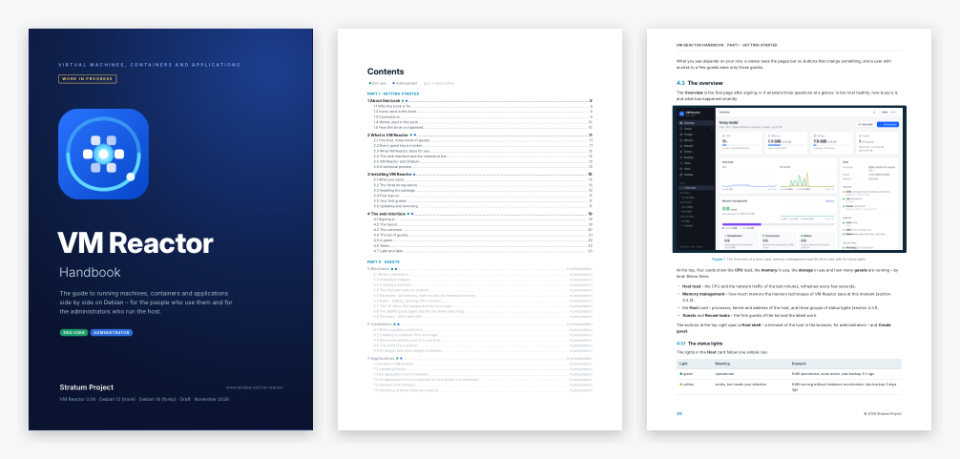
VM Reactor Handbook
The VM Reactor Handbook is being written. This first draft contains the cover, the complete contents and the first chapters; the chapters shown in grey in the contents are in preparation and follow in the next drafts, together with VM Reactor itself.
- Getting started – what VM Reactor is, installation and a tour of the web interface (in this draft)
- Guests – machines, containers and applications; consoles, snapshots and clones; starting, stopping and the watchdog (in preparation)
- Resources of the host – storage, memory, networks, backups and restore (in preparation)
- Administration – users and roles, securing the web interface, the Stratum integrations and updates (in preparation)
- Reference – every command and switch, files, troubleshooting and a glossary (in preparation)
Draft · November 2026 · VM Reactor 0.08 · Stratum Project
On a VM Reactor host:
apt install vm-reactor-handbook – the book is then at /usr/share/vm-reactor/handbook/vm-reactor-handbook.pdf.