This is an old revision of the document!
Remote support
Expert help for your Stratum computers – secure, time-limited and fully under your control.
Encrypted SSH Nothing opened in your firewall Time-limited sessions Every keystroke recorded
Remote support is part of Stratum, the functional layer for Debian. When something does not work as it should, you open a support session on your computer with one command or two keys in the menu, give the Stratum support team a short session code, and they can look into the problem directly – for as long as you allow, and not a minute longer.
Support is provided by the stratum-support module. There is no remote-desktop program to install, no account to create and no password to share.
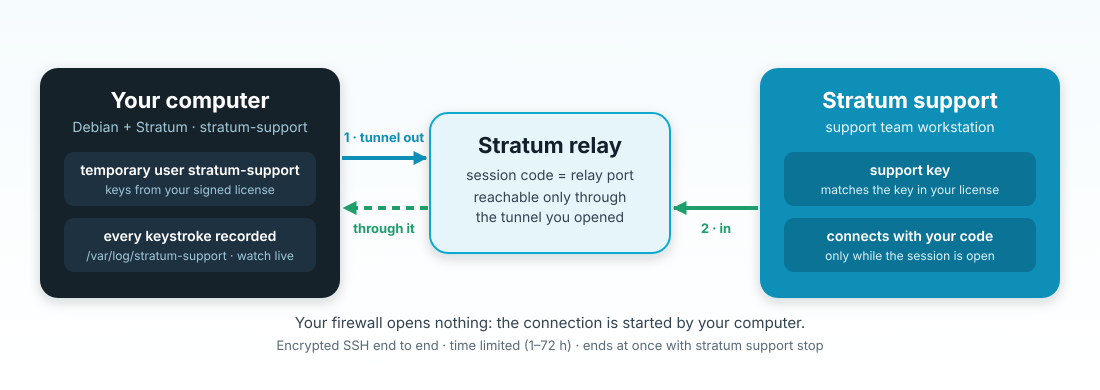
Why it is safe
stratum support stop – access is gone at once.
stratum-support, which exists only during the session and accepts logins only through the tunnel. When the session ends, the user, its keys and its rights are removed.
/var/log/stratum-support. You can follow it live with stratum support watch and read it again later; stratum support sessions lists past sessions.
stratum support report –anonymize) is frequently enough. It contains status, packages, resources, network and recent errors – with the host name, IP and MAC addresses replaced.
What you need
- A computer with Debian 13 (trixie) or Debian 14 (forky) and the Stratum repository – see Installing Stratum.
- A Stratum license that includes the feature
support(packagestratum-license). - The package
stratum-support. - Outgoing internet access from the computer to the Stratum relay
www.skraba.netover SSH (TCP port 22). Nothing incoming is required.
Setting up remote support – once
1. Install the modules
apt-get install stratum-license stratum-support
2. Request a license – the request code contains the hardware ID of the computer (also shown as a QR code in the menu):
stratum license request
Send the request to Stratum support (stratum@skraba.net). You receive a signed license – as a file or as a code to paste.
3. Install the license
stratum license install /root/stratum-license.txt # or: stratum license install (paste the code)
4. Check it – the feature support must be listed:
stratum license status
stratum license check support && echo "remote support available"
The license is bound to the computer and protected against a changed system clock.
Getting help, step by step
stratum menu: support → session, or stratum support start 4.
stratum support watch; the session ends by itself or with stratum support stop.
# stratum support start 2
  ✓ remote support session 20261024-203717 is open until 2026-10-24 22:37
   Session code:  35161
   Give this code to Stratum support.
   Support has root rights (sudo) during the session; everything typed is
   recorded in /var/log/stratum-support. Follow it live: stratum support watch
   End it now: stratum support stop
stratum → support)
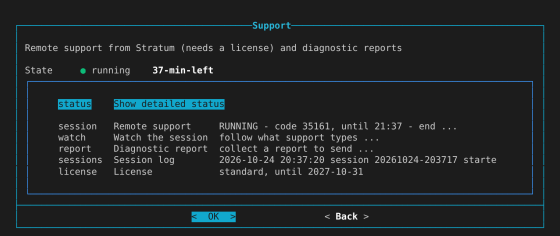
During a session the support team has administrator (root) rights on the computer, so that it can repair what is wrong. Open a session only when you have asked Stratum support for help, and give the session code only to the support team you are in contact with.
Commands at a glance
| Command | What it does |
|---|---|
stratum support start [hours] | Open a session (1–72 hours, default 4) and show the session code. |
stratum support status | Is a session running, until when, and the license. |
stratum support watch | Follow live what the support team types and sees. |
stratum support stop | End the session now; access is removed at once. |
stratum support sessions [n] | Past sessions with their recordings. |
stratum support report [–anonymize] | Create a diagnostic report to send instead of a session. |
Questions
Does support see my screen or my desktop?
No. Support works on the command line of the computer, through SSH. There is no screen sharing, and the session gives access to this one computer only.
Can support connect again later, without asking?
No. Without an open session there is no tunnel and no stratum-support user. Every new session needs you to start it, and it gets a new code.
What if the firewall blocks outgoing SSH?
Allow outgoing TCP port 22 to www.skraba.net, or send a diagnostic report instead. Incoming connections are never needed.
Which computers are supported?
Computers with Debian 13 (trixie) or Debian 14 (forky) and Stratum, with a valid license that includes remote support.
The full description – for users and for the support team – is in the Stratum Handbook, chapter “Asking for remote support”.