This is an old revision of the document!
Stratum
A functional layer for Debian.
In geology, a stratum is a distinct layer within a larger structure: part of the whole, yet defined by its own properties. Stratum applies the same principle to Debian.
Overview
Stratum is an extension layer on top of a standard Debian installation: it adds system administration tools, standardized configurations, security policies, monitoring and automation, and management agents – without replacing or forking the system. Debian's packages, stability and established workflows stay exactly as they are; the components are modular and transparent, so each system installs only what its role requires. Debian provides the foundation, Stratum provides the additional capabilities – and the system remains Debian.
Stratum is not a distribution. It is a layer.
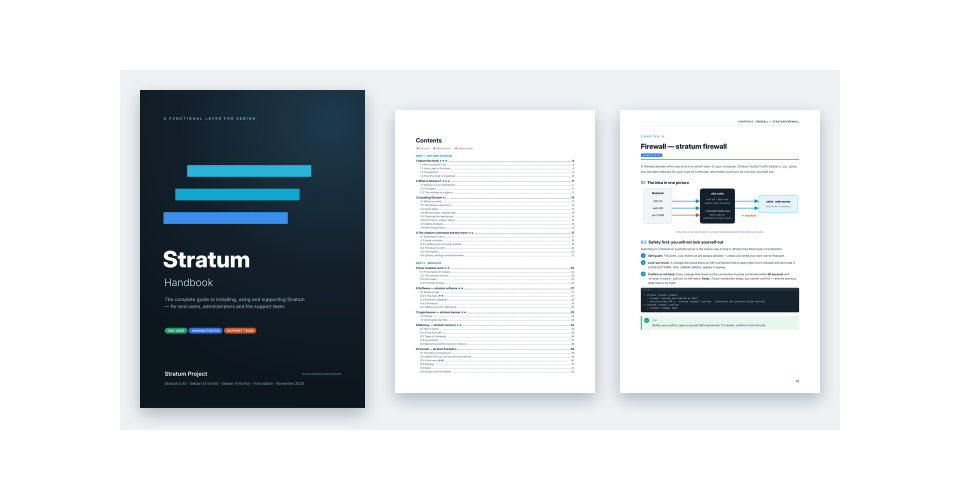
Stratum Handbook
- Getting started – what Stratum is, installation, the
stratumcommand and the menu - Modules – software (repositories and automatic upgrades), banner, memory, firewall, security, Ansible, watchdog, file server, database and the WireGuard mesh: every command and switch, with examples
- License and support – getting a license, asking for remote support, and how the support team gives it
- Reference – the project and its repository, all commands, files, troubleshooting, glossary and a quick reference card
First edition · October 2026 · Stratum 0.41 · Stratum Project
On a Stratum computer:
apt install stratum-handbook – the book is then at /root/stratum-handbook.pdf.
Installation
Stratum packages for Debian 13 (trixie) and Debian 14 (forky, currently testing) are published in a signed APT repository – one suite per Debian release, with the same packages.
Signing key: Stratum Archive Signing Key stratum@skraba.net
Fingerprint:
4F39 6C32 8AB5 D14E F653 55CF 130D EB73 9D1E 1A2C
Quick setup
Run as root on Debian 13 or Debian 14. The script downloads the signing key, verifies its checksum, installs it, adds the repository for the system's release (the codename from /etc/os-release: trixie or forky) and installs stratum-init (the core, with stratum-banner):
apt-get update && apt-get install -y curl ca-certificates
curl -fsSL https://www.skraba.net/stratum-apt/stratum-archive-keyring.gpg -o /tmp/stratum-archive-keyring.gpg
echo "4e9b1cb45f58d955340ac93b6c8d997d900d9780d005f002ce978bab39d53647  /tmp/stratum-archive-keyring.gpg" | sha256sum -c - \
  && install -m 0644 /tmp/stratum-archive-keyring.gpg /usr/share/keyrings/stratum-archive-keyring.gpg \
  && . /etc/os-release \
  && cat > /etc/apt/sources.list.d/stratum.sources <<EOF && apt-get update && apt-get install -y stratum-init
Types: deb
URIs: https://www.skraba.net/stratum-apt/
Suites: $VERSION_CODENAME
Components: main contrib non-free
Signed-By: /usr/share/keyrings/stratum-archive-keyring.gpg
EOF
If sha256sum reports FAILED, nothing is installed: stop and check the signing key.
Manual setup
1. Download the signing key:
curl -fsSL https://www.skraba.net/stratum-apt/stratum-archive-keyring.gpg -o /usr/share/keyrings/stratum-archive-keyring.gpg
2. Create the repository source – Suites is the codename of the Debian release: trixie (Debian 13) or forky (Debian 14), see VERSION_CODENAME in /etc/os-release:
- stratum.sources
Types: deb
URIs: https://www.skraba.net/stratum-apt/
Suites: trixie
Components: main contrib non-free
Signed-By: /usr/share/keyrings/stratum-archive-keyring.gpg
- stratum.sources
Types: deb
URIs: https://www.skraba.net/stratum-apt/
Suites: forky
Components: main contrib non-free
Signed-By: /usr/share/keyrings/stratum-archive-keyring.gpg
3. Update the package lists and install stratum-init (the core, with stratum-banner):
apt-get update && apt-get install stratum-init
Install Stratum
stratum-init is installed by the setup above. Start the menu and add the modules you need – in the menu under modules (check to install, uncheck to remove), or with APT:
stratum                             # interactive menu
apt-get install stratum-software stratum-memory stratum-firewall stratum-security
apt-get install stratum-license stratum-support stratum-ansible
apt-get install stratum-fileserver stratum-database stratum-wireguard
stratum help <module>               # all actions and options of a module
What each package does is described under Packages.
Signing key
To check a downloaded key (requires gnupg), compare its fingerprint with 4F39 6C32 8AB5 D14E F653 55CF 130D EB73 9D1E 1A2C:
gpg --show-keys --with-fingerprint /usr/share/keyrings/stratum-archive-keyring.gpg
The same key in ASCII-armored form, for import with gpg –dearmor:
- stratum-archive-keyring.asc
-----BEGIN PGP PUBLIC KEY BLOCK-----

mDMEath3eRYJKwYBBAHaRw8BAQdA/Q19broWumbPBohWxqpA0JHjcElCxZd/qcVB
SkhbwOO0MFN0cmF0dW0gQXJjaGl2ZSBTaWduaW5nIEtleSA8c3RyYXR1bUBza3Jh
YmEubmV0PoiWBBMWCgA+FiEETzlsMoq10U72U1XPEw3rc50eGiwFAmrYd3kCGwMF
CQlmAYAFCwkIBwIGFQoJCAsCBBYCAwECHgECF4AACgkQEw3rc50eGizXLwD/eDij
buXgBpj7Sfi1L6zzE7EFTdUAkbw2oYfwOz/26e8BALfgBJdnVlpizJZjhFIkvrvm
FlhB2i47OEHJuhfmsREL
=RrPo
-----END PGP PUBLIC KEY BLOCK-----
Using the repository
# list all packages available from Stratum
grep -h '^Package:' /var/lib/apt/lists/*stratum-apt*_Packages | sort -u

# show where a package comes from
apt-cache policy <package>

# install a package
apt-get install <package>
Optional: install stratum-archive-keyring so that future key updates and source changes arrive through APT.
Removal
apt-get purge -y stratum-archive-keyring 2>/dev/null
rm -f /etc/apt/sources.list.d/stratum.sources /usr/share/keyrings/stratum-archive-keyring.gpg
apt-get update
Packages already installed from Stratum stay on the system until removed with apt-get purge.
Packages
Stratum is split into small packages. stratum-init is the core; every other package adds one module, managed in the stratum menu or with stratum <module> <action>. All packages are for Debian 13 (trixie) and Debian 14 (forky), amd64 and arm64; on any other system Stratum reports an unsupported configuration.
| Package | Module | Type | Description |
|---|---|---|---|
stratum-ansible | ansible | setting | Ansible the Stratum way, with three roles switched on separately: managed node (user ansible with the controllers' SSH keys, optionally only from their addresses, sudo, firewall rule), pull (ansible-pull of a playbook from a git repository by a timer – apply, or only check what would change) and controller (inventory, playbooks with check before run, ad-hoc commands such as ping, updates or reboot, controller SSH key, vault password, Galaxy roles). Every run is logged with ok / changed / failed; example playbooks include a Stratum baseline for many hosts. |
stratum-archive-keyring | — | — | The repository signing key, kept up to date through APT; when there is no APT source yet, it writes /etc/apt/sources.list.d/stratum.sources for the system's release (trixie or forky). |
stratum-banner | banner | profile | Stratum line on the login screen and in the MOTD. Profiles: standard – also the Stratum logo above the first login screen after boot; minimal – only the Stratum line; discrete – nothing shows that Stratum is installed (needs a valid license from stratum-license; without one, minimal is used). Always installed with stratum-init. |
stratum-database | database | service | MariaDB server from Debian: databases (create; delete always with a backup first), users with passwords and the hosts they may connect from, permissions per database (read, write, all, admin), backups – daily timer, kept per database, manual backup and restore (also into another database) – and the main settings: where MariaDB listens (this computer only by default), firewall access, maximum connections, InnoDB buffer, slow query log; secure removes anonymous users, remote root and the test database; running queries. |
stratum-fileserver | fileserver | service | Shared folders with Samba and NFS: shares (folder, protocol smb / nfs / both, comment, visibility, recycle bin), users only for file sharing (no login) or existing users with a Samba password, groups for teams, access per share – write and read for users and @groups, guest read access, NFS clients per network with rw / ro and root squash. Folder permissions are set with POSIX ACLs; Samba (SMB2 / SMB3) and NFS (v4, optionally v3 with fixed ports) are configured from one place; the firewall follows the shares (local networks, any or chosen networks); current connections. |
stratum-firewall | firewall | service | Host firewall with ufw. Settings in the menu: type of computer (workstation, server, hypervisor, vm-guest – each with sensible defaults), allowed services – service presets (SSH, web, DNS, Samba, NFS, mail, databases, WireGuard, Proxmox, Cockpit …) or tcp/udp ports and ranges, on all or one network interface, from anywhere or one address / network, optionally rate limited – default policies for incoming, outgoing and routed traffic, IPv4 + IPv6, ping and logging. SSH guard: the SSH port stays open unless an own rule covers it; a change that would block an open SSH connection is refused unless confirmed (“Apply anyway”), and every change must be confirmed (“Keep”) within 60 seconds – otherwise the previous state returns automatically. Overviews: listening services (allowed / blocked) and events – blocked connections of the last 24 hours (top sources, top ports, the last 10). Docker: published container ports follow the same rules (chain DOCKER-USER, by the host port) instead of bypassing the firewall – setting protect (default) or open; the listening overview shows the containers. Rules of other modules: the file server, the database and the WireGuard mesh add the ports and forwarding they need (/etc/stratum/firewall.d); only these rules are re-applied when they change. Rules added by hand with ufw stay untouched. |
stratum-handbook | — | — | The Stratum Handbook as PDF (A4, about 112 pages; for end users, administrators and the support team): installation, the menu, every module with all commands and switches, the license, remote support and a reference. Installed as /usr/share/stratum/handbook/stratum-handbook.pdf, with a link /root/stratum-handbook.pdf. Install it with apt install stratum-handbook. |
stratum-init | stratum | setting | The stratum command and the interactive menu: the Stratum repository and all modules in one table, installing and removing modules (modules, with a freshly updated package list), and stratum status (checks that the repository is active and working). Requires stratum-banner. |
stratum-license | license | setting | The Stratum license of the computer. A hardware ID (from the DMI product UUID, the machine ID and the MAC address – the license stays valid while two of the three match) and a license request code (also as QR code) to send to Stratum. The license is a text file signed by Stratum (Ed25519, checked offline) with level, features (e.g. support) and validity including a grace period; entered in the menu by pasting the license code or importing the file. Other modules ask it with stratum license check <feature>. Setting the clock back does not make an expired license valid again: the license uses the latest of the system clock, the date of the signed APT repository metadata and the latest time seen before (/var/lib/stratum/license/clock, kept up to date daily by stratum-license-clock.timer); stratum license clock shows them, status warns when the system clock is behind. |
stratum-memory | memory | service | Memory management with three techniques, chosen by the type of computer (workstation, server, small, hypervisor, vm-reactor, vm-guest – each with sensible defaults) and switched one by one: compression – compressed swap in RAM (zram), created by Debian's systemd-zram-generator – no conflict with Debian packages; memory for zram (GB or auto), swappiness (low, medium, high, maximum), compression (zstd – better compression, recommended / lz4 – fastest) and disk swap as reserve – the existing one, or /var/swapfile of at most 4 GB; zram always has the highest swap priority: it is used first, disk swap only when zram is full. Deduplication – KSM with ksmtuned keeps equal memory pages of virtual machines once (only on a physical host). Ballooning – below a limit of free host memory the virtual machines give memory back, never below their minimum, and get it again when there is enough. Deduplication and ballooning are on for the types hypervisor and vm-reactor. |
stratum-security | security | service | fail2ban bans addresses that fail to log in too often (with nftables). Settings in the menu: type of computer (workstation, server, hypervisor, vm-guest), ban time, failures before a ban, window, longer repeated bans, protected services (only installed ones: SSH, recidive, nginx, Apache, Dovecot, Postfix), whitelist (never banned; suggests the local networks), banned addresses (ban / unban) and events – SSH logins and failed logins, bans, sudo and Docker containers that crashed, ran out of memory or became unhealthy – the last 24 hours in a few lines. A separate list SSH and system hardening (off by default): SSH keys only, root only with a key, SSH login limits, network and kernel sysctl. Lock-out protection: open SSH connections go on the whitelist, risky changes (e.g. keys only without any key) are refused unless confirmed, SSH changes are undone automatically unless confirmed within 120 seconds. Own fail2ban configuration stays. |
stratum-software | software | setting | Where the software comes from and how it is kept up to date. Repositories – APT repositories in deb822 format, chosen in a checklist: binary packages first, source packages (deb-src) at the bottom; components – main, contrib, non-free, non-free-firmware; automatic upgrades – daily with unattended-upgrades, one of the profiles complete (all packages – security updates and package updates), security (security updates only, the default) and turn-off; never reboots automatically. Ships the official Debian repositories of the system's release (e.g. trixie, trixie-updates, trixie-security, trixie-backports; on Debian 14 the forky ones) and the Stratum repository (always on; only its source packages can be switched off); own repositories as definition files in /etc/stratum/repos.d. Official Debian 13 and 14 only. |
stratum-support | support | service | Remote support from Stratum – only with a license that has the feature support. A session opens an encrypted SSH reverse tunnel to the Stratum relay (relay and its host key come from the signed license; nothing is opened in the firewall) and shows a session code to give to support. Support gets a temporary user with the support keys of the license and sudo; every terminal session is recorded and can be followed live; after the chosen time (1–24 h) or at once with end session, all access is removed. Diagnostic report of Stratum and the system, optionally anonymized. Requires stratum-license. |
stratum-watchdog | watchdog | service | Checks the key parts of the system and restarts what has failed – in two layers: key services (ssh, cron, rsyslog, chrony/timesyncd, fail2ban, Docker, containerd) are restarted by systemd itself (their own policy or a Stratum drop-in with Restart=on-failure), and a timer runs checks every minute: failed services, SSH (runs and answers), cron, journal, time synchronisation, network and DNS, disk space and read-only file systems, out-of-memory kills, APT/dpkg, required reboots, kernel I/O errors, Stratum modules, Docker and unhealthy containers, SMART/RAID – plus own checks in /etc/stratum/watchdog.d/. A problem is repaired when it persists (restart, then checked again), at most 3 times per hour; then it needs attention: events (stratum watchdog events, also in stratum security events and the support report), journal, a line in the MOTD, optional e-mail or webhook. Settings: type of computer, interval, restart limit, disk limits, cleanup of a full disk, notification, hardware watchdog (off). Never reboots, never touches the network, never starts services you stopped yourself, no repairs while apt/dpkg works; pause / resume for maintenance. |
stratum-wireguard | wireguard | service | WireGuard mesh network: one computer coordinates the mesh – it creates it and invites computers with a one-time code (stratum wireguard join SWG1:… on the new one; no keys copied by hand). The member list is served through the tunnel and fetched every minute; members connect to each other directly (also behind NAT, with hole punching) and, when that is not possible, through the coordinator (relay). Members, last handshake and path (direct / relay), ping, removal, member names in /etc/hosts (<name>.<mesh>), settings: endpoint, port, trust of the mesh, relay, keepalive, MTU. With stratum-firewall: UDP port, traffic from the mesh, relay. Networks behind a member (files in /etc/stratum/wireguard/routes.d) are routed through the mesh; overlapping networks are refused. |
In the stratum menu every row shows NAME, TITLE, TYPE, STATE (green ● running / active, yellow ○ stopped / inactive, red ● e.g. mismatch or unsupported), BOOT and PROFILE. The types:
- service – runs and can start at boot: STATE running or stopped, BOOT enabled or disabled; in the menu: start / stop, enable / disable and the settings (e.g.
memory,firewall,security,fileserver); some settings open their own dialog (e.g. the firewall rules or the shares of the file server). A change that could cut the SSH connection asks Keep or Roll back – without an answer it is undone automatically – and a risky change shows a warning first (Apply anyway). - setting – a configuration that is applied or not: STATE active or inactive; in the menu: enable / disable and profile, or – for
software– directly its lists repositories, components (checklists) and upgrades (one choice). The first row,stratum, is the Stratum repository itself: active when it is configured for the system's release, Enter shows its full status. - profile – always applied, only the profile is chosen; selecting the row opens the profile choice directly (e.g.
banner).